There are three ways to change your cPanel mailbox password. You can do this either by using the Email Account menu, the User Manager menu or directly from Webmail.
Password change tips:
- Your password must be at least 8 characters long and contain at least 1 uppercase character, 1 lowercase character, and 1 number.
- Use a combination of 8+ characters for a strong password.
- Your mailbox password cannot contain spaces or the following characters: \, &, +, '.
- These characters can be used: [a-zA-Z0-9#!@$%^*()_="?.,/;:<>`{|}~-[]].
How to change a password from Webmail.
- Log in to the Webmail. (ex: abcd.com/webmail )
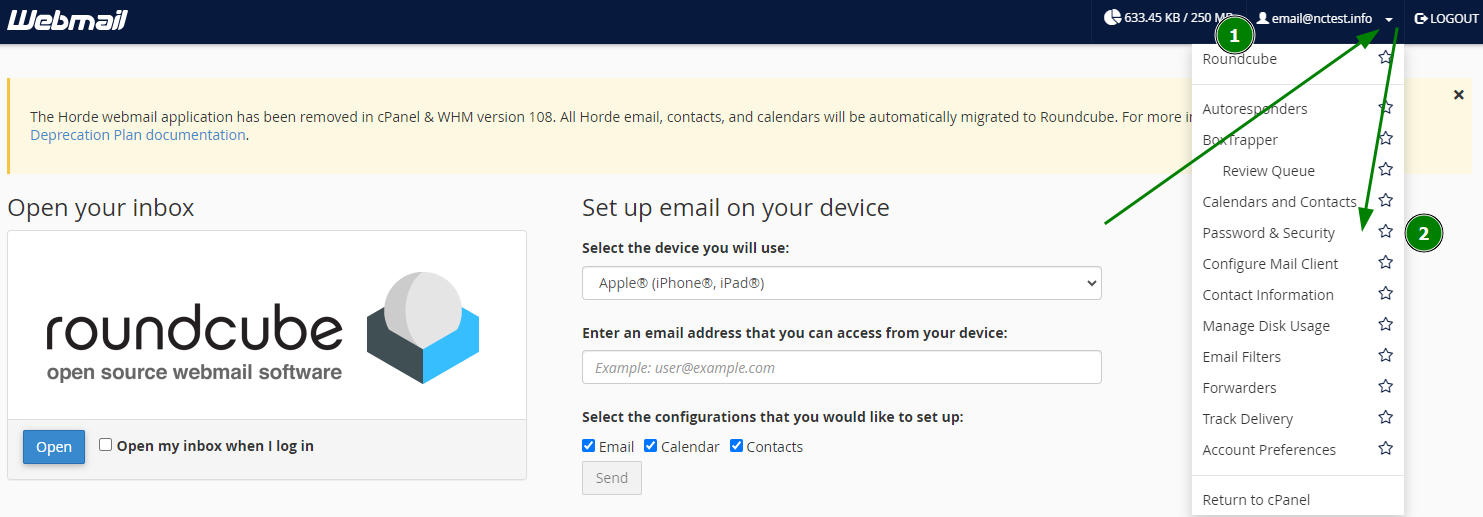
- Click on the email address displayed on the top-right corner of the webmail and click on the “Password & Security” option from the listed menu.
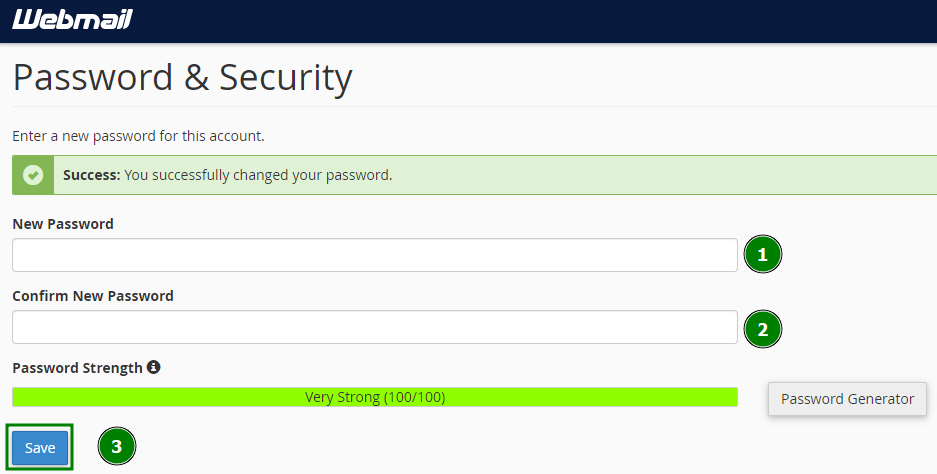
- Type the new password that you want to use for your email account in both boxes “New Password” and “Confirm New Password” and then click the button “Save” to reset your old password with the new password.
Success!
Need any more help? Contact our Help Center.